
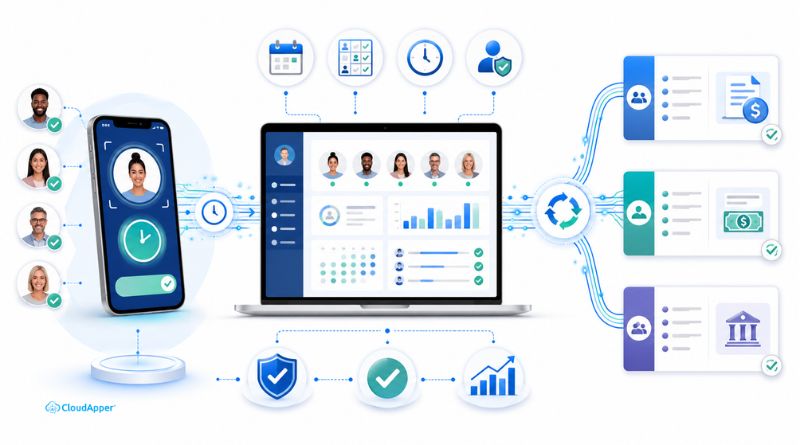
For more information on CloudApper AI TimeClock visit our page here.
Staffing agencies and workforce solutions companies face a payroll challenge that most HR technology articles ignore entirely.
You’re using Workday HCM to manage your placed workers and Paylocity to run payroll. But your employees — temporary staff, contractors, and contingent workers — aren’t clocking in at your office. They’re working at a dozen different client sites, each with its own setup, its own supervisor approval process, and often no reliable way to capture time and send it back to you in a format Workday can actually use.
The result: your payroll team is chasing down timesheets every pay period. Client supervisors are emailing spreadsheets. Hours arrive late, get keyed in manually, and flow into Paylocity with errors that cost you money — and damage your relationship with the clients who trusted you to manage their contingent workforce cleanly.

Why Staffing Payroll Breaks Differently Than In-House Payroll
Most companies with a Workday-to-Paylocity integration problem own the problem entirely. Their employees punch in on-site, data flows to Workday, and the issue is a configuration or sync gap.
Staffing agencies have a more complicated version of this:
- Time capture happens at the client site, not your facility — and you have no control over the client’s systems
- Multiple bill rates and pay rates for the same worker across different placements mean a single punch means nothing without a job code
- Client supervisor approvals are a bottleneck — if a supervisor is slow to sign off, your payroll misses the cutoff
- Contractor mix complexity — some workers are W-2 temps, others are 1099 contractors, and Paylocity treats them differently; the time data needs to be pre-classified before it hits payroll
- Compliance exposure — under co-employment rules, accurate time records for placed workers aren’t just a payroll issue, they’re a legal liability
A staffing agency running 200 active placements across 15 client sites cannot manually reconcile all of this each pay period. But most are doing exactly that.
The Fix: A Time Capture Layer You Deploy at Client Sites
CloudApper AI TimeClock solves this by giving you a time capture tool you can deploy at any client site — on an existing iPad or Android tablet — without requiring the client to change any of their own systems.
Here’s how it works in a staffing context:
Workers clock in at the client site using facial recognition. The tablet sits at the client’s front desk, break room, or job floor. Placed workers verify their identity biometrically — no cards to lose, no PINs to forget, no buddy punching. This is critical when your temp workers are in a facility with dozens of permanent employees who don’t share your time-tracking system.
Each punch is tagged to the placement, client, and pay rate automatically. When a worker clocks in, the system associates their hours with the correct placement record in Workday — including the bill code for that client and the corresponding pay rate. No manual allocation after the fact.
Supervisor approvals happen in real time via mobile. Client supervisors can review and approve timecards from their phones — no spreadsheet, no email chain, no chasing. Approved time moves immediately toward the Workday sync.
Clean, classified hours flow into Workday and then to Paylocity. The CloudApper iPaaS integration layer applies your payroll classification logic — W-2 vs. contractor, overtime thresholds, client-specific billing rules — before data reaches Paylocity. Payroll receives worker hours that are already sorted, coded, and rule-compliant.
What This Means for Your Payroll Cycle
For a staffing agency managing active placements across multiple client sites, this approach transforms the payroll cycle from reactive to automated:
Before: Timesheet emails arrive Thursday. HR manually keys 180+ entries into Workday. Paylocity closes Friday — often with corrections still outstanding. Three workers get paid wrong. Two clients get incorrect billing invoices.
After: Hours capture continuously throughout the week. Workday updates in real time. Paylocity receives clean, approved, classified hours automatically. Payroll closes on time. Billing data is accurate. Compliance records are complete.
For a deeper look at how the Workday-to-Paylocity data flow works technically, see the original integration guide: Integrating Workday HCM with Paylocity for Payroll Processing.
Three Things to Do This Week
1. Audit how contractor hours currently enter Workday. If the answer involves any email, spreadsheet, or manual entry step, that’s your risk point — and it compounds with every new placement you add.
2. Identify your two highest-volume client sites. Start a pilot there. Deploying CloudApper AI TimeClock on a single tablet at each site takes hours, not weeks. The CloudApper team handles Workday and Paylocity configuration to match your pay rules and placement structure.
3. Measure payroll accuracy before and after. Track how many corrections your team processes per pay period currently. After one quarter on this system, that number typically drops by more than half.
Staffing agencies grow by placing more workers and winning more clients — not by scaling up the back-office team to manage bigger spreadsheets. Automating the time capture-to-payroll pipeline with CloudApper AI TimeClock makes growth scalable without adding administrative headcount.
→ See how CloudApper AI TimeClock works, explore the full CloudApper platform, or learn more about seamless enterprise system integration for Workday and Paylocity.
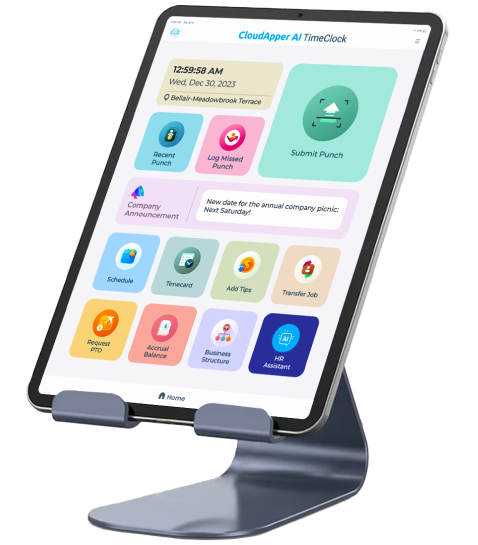
Super Efficient Employee Time Clock Kiosk Application
Cost Effective Employee Time Clock Application for All Major HR, HCM and Payroll Systems
Learn more → | Download Brochure →